![White full logo.png]](https://help.virto.solar/hs-fs/hubfs/White%20full%20logo.png?height=40&name=White%20full%20logo.png)
Review live project values
As the design evolves and modules are added or removed, Virto.MAX updates project capacity and the expected annual production shown in the project bar. Use this as a fast comparison while testing layouts.
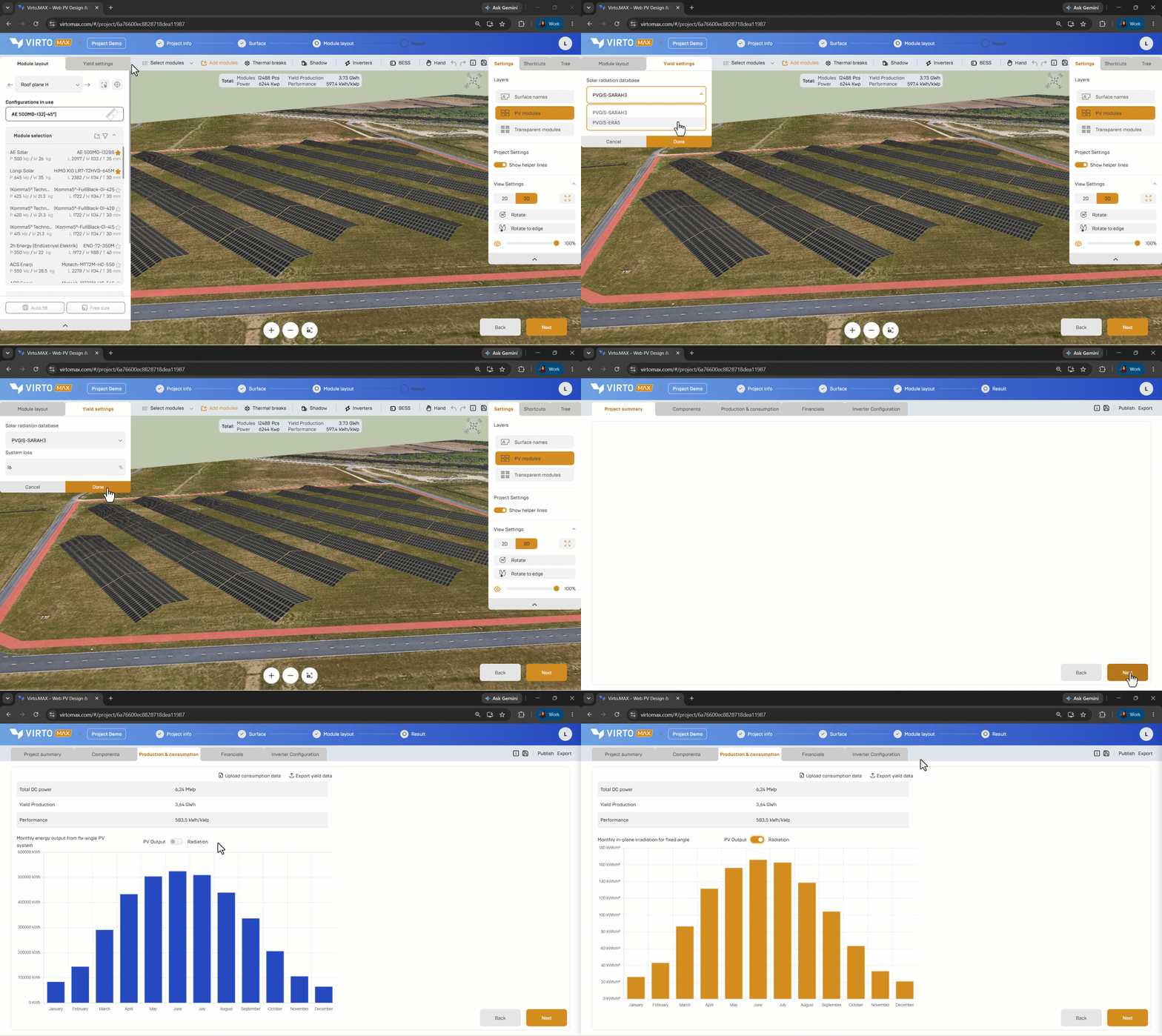
Configure the yield settings
- Open Yield settings.
- Confirm the project location and weather-data source. Virto.MAX uses PVGIS-based data for its standard yield workflow.
- Enter the expected system-loss percentage.
- Save the settings and continue to the results.
Review the results
The yield results include:
- Expected annual energy production.
- Monthly energy production.
- Monthly in-plane irradiation.
- Downloadable yearly or hourly output where available.
Use PVsyst export when the project requires a more detailed, bankable simulation with advanced loss modelling.
Good to know: The annual result can be calculated independently from the rounded monthly values. For that reason, the displayed annual total may differ slightly from the sum of the monthly figures.
Next step: PV Syst export or Evaluate production and consumption.